Xtreme Pixel Plugin
Comandos dentro del juego y opciones principales de config.ini para personalizar FPS, overlays, M2E, rangos y efectos.
17 Comandos (@)
8 Funciones
FPS
/fps, /fpsunlock
M2E
SkillXXXX
Rangos
/circle, /square, /range
Overlays
/alpha, /bbe, /dead
Funciones del plugin
Resumen de cada funcion y su comando o clave de configuracion.
| Funcion | Descripción | Comando / config |
|---|---|---|
| FPS | Muestra u oculta el contador de FPS en pantalla. | /fps, [State] fps |
| FPS unlock | Permite cambiar el limite de FPS o volver a VSync. | /fpsunlock [FPS], [State] fpsunlock |
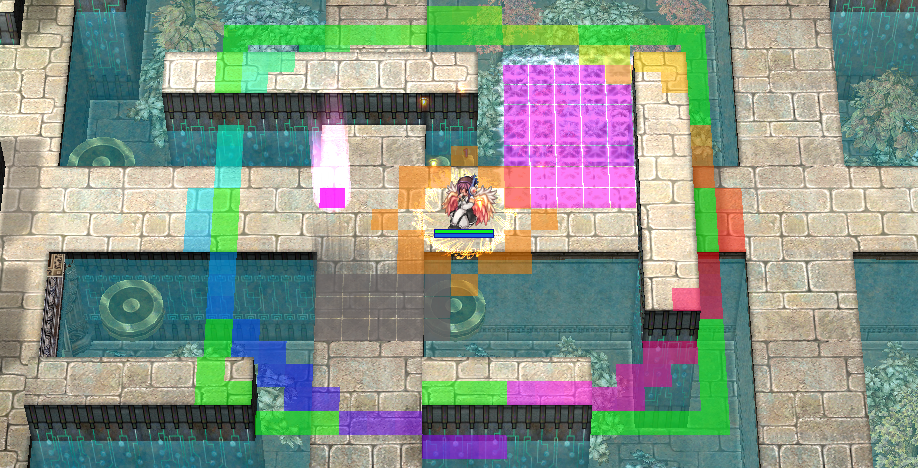
| M2E | Muestra areas de efectos de skills de suelo segun colores configurados. | /m2e, [M2E] SkillXXXX |
| ShowEffects | Fuerza que algunos efectos se vean aunque /effect este desactivado. | [XtremePixel] ShowEffects, /reload |
| BBE / gutterlines | Muestra lineas de Bowling Bash y demigutter. | /bbe, Gutterline, Demigutter |
| Dead cells | Marca celdas no caminables o bloqueadas. | /dead, Deadcell |
| Rangos manuales | Dibuja circulos o cuadrados alrededor del personaje con valores entre 1 y 24. | /circle, /circle1, /circle2, /square |
| Rango automatico | Dibuja el rango dinamico de la skill preparada. | /range, Range |
| Alpha | Cambia la transparencia general de overlays o solo la transparencia de M2E. | /alpha <0-100>, /alpha m2e <0-100> |
Comandos dentro del juego
| /fps | Activa o desactiva el contador de FPS. |
| /fpsunlock [FPS] | Alterna VSync o fija un limite de FPS positivo. |
| /m2e | Activa o desactiva el overlay M2E. |
| /bbe | Activa o desactiva gutterlines de Bowling Bash. |
| /dead | Activa o desactiva dead cells. |
| /square [1-24] | Activa el rango cuadrado o cambia su valor. |
| /circle [1-24] | Activa el circulo principal o cambia su valor. |
| /circle rainbow | Activa o desactiva el color animado del circulo principal. |
| /circle1 [1-24] | Controla el segundo circulo independiente. |
| /circle2 [1-24] | Controla el tercer circulo independiente. |
| /range | Activa o desactiva el rango automatico de skill. |
| /alpha 50 | Cambia la transparencia general de overlays. |
| /alpha m2e 50 | Cambia solo la transparencia de M2E. |
| /reload | Recarga ShowEffects desde config.ini. |
Configuracion en config.ini
La DLL busca config.ini en la carpeta del ejecutable del cliente. Los booleanos usan 1 para activar y 0 para desactivar.
[Misc Color]
Colores de overlays en formato 0x00RRGGBB. El alpha se controla con /alpha.
Deadcell = 0x00FF00FF
Chatscope = 0x0000FF00
Castrange = 0x007F00FF
Circle1 = 0x0000FFFF
Circle2 = 0x00FFFF00
Range = 0x00FF7F00
Gutterline = 0x00FF0000
Demigutter = 0x000000FF
[State]
Estado persistente actualizado automaticamente al usar comandos en el juego.
fps = 1
m2e = 0
bbe = 0
deadcells = 0
circle = 0
circle_range = 9
circle_rainbow = 0
square = 0
square_range = 9
circle1 = 0
circle1_range = 9
circle2 = 0
circle2_range = 9
range = 0
alpha = 50
alpha_m2e = -1
fpsunlock = 0
[M2E]
Colores de skills en formato 0xAARRGGBB. SkillXXXX define el color para el ID hexadecimal de la skill.
Skill007E = 0xBFFF00FF
Skill007F = 0x7F880000
Notas importantes
- Los rangos manuales se limitan a 1..24.
- /range no guarda rango manual; detecta el rango dinamicamente desde el cliente.
- Cambios de colores y M2E requieren reiniciar el cliente, salvo ShowEffects, que puede recargarse con /reload.
- alpha_m2e = -1 significa que M2E usa el alpha propio de cada color configurado en [M2E].